
Linear Programming Simplified for School Students | PlanetSpark


Table of Contents
Mathematics can sometimes feel like a puzzle, especially when students encounter problems involving optimisation, planning, or decision-making. Linear programming is a powerful tool that helps students learn how to find the best possible solution when there are limits or conditions to follow. It isn’t just about numbers, it’s about thinking logically, analysing situations, and making smart choices.
At PlanetSpark, we simplify complex concepts like linear programming for school students through interactive examples, step-by-step guidance, and fun exercises. Using relatable scenarios from daily life, students learn to apply mathematical reasoning confidently while enjoying the process. By visualising problems and understanding constraints, they can tackle challenges systematically, preparing them not only for exams but also for real-world problem-solving.
Learning linear programming early equips students with critical thinking skills, strengthens their understanding of algebra, and builds a solid foundation for higher mathematics. Fun examples and hands-on exercises make learning effective, practical, and engaging for every learner.

Linear Programming Simplified for School Students | PlanetSpark
Linear programming is all about finding the best possible solution under given limits. It helps students decide how to allocate resources, manage time, or maximise results efficiently. For example, a student may want to balance study hours between subjects to maximise marks or choose activities to fit within a limited schedule.
By setting up equations and inequalities, they can visualise the problem on a graph, identify feasible solutions, and pick the optimal choice. PlanetSpark solves mathematical queries like what is linear programming with simple explanations, relatable examples, and fun exercises. We help make tricky math problems approachable, understandable, and enjoyable for young learners.
What Is Linear Programming?
Linear programming is a method used to find the best solution, like maximizing profit or minimizing costs, while working within given limits. For example, a student might use linear programming to figure out how to balance time between homework and extracurricular activities to achieve the best results.
Students represent real-world problems using simple equations and inequalities, then solve them using graphs or calculations. This makes it easy to visualize solutions and make logical decisions efficiently.
By learning linear programming, students can solve optimization problems in various areas, such as budgeting, scheduling, and resource allocation. It helps them make smarter choices and prepares them for more advanced topics in mathematics and decision-making.
Make maths exciting, not intimidating. Help your child master linear programming with simple examples, clear steps, and interactive charts. Start their confident problem-solving journey with PlanetSpark today!
Why School Students Learn Linear Programming?
Learning linear programming helps students develop problem-solving skills and think logically. For example, imagine a student has to balance study hours between math and science to maximize their grades. Using linear programming, they can figure out how to allocate their time most efficiently.
It also helps with real-life decisions, like managing a limited budget for a school event, where they must decide how to spend money on food and decorations. By solving these linear programming problems, students learn how to make the best choices within constraints.
This skill prepares them for advanced math topics and enhances logical thinking, allowing them to make smarter decisions in both school and everyday life. It’s a great way to think strategically and plan ahead.
Key Terms Used in Linear Programming
Understanding the basic terms of linear programming is more important than memorising formulas. Students can solve problems efficiently once they visualise what each term means and how it applies to real-life situations.
Decision Variables
These are the unknown quantities students need to find. For example, if a student is deciding how many hours to study Maths (x) and Science (y), x and y are the decision variables that define choices.
Objective Function
This represents what needs to be maximised or minimised, such as marks, profit, or time. Example: Maximise Z = 4x + 3y, where Z is the total marks. This guides students to focus on the goal.
Constraints
Constraints are limits or conditions in the problem, like maximum study hours or available resources. Example: x + y ≤ 10 means the total hours for Maths and Science cannot exceed 10 hours in a day.
Feasible Region
The feasible region includes all possible solutions that satisfy constraints. It’s usually shown as a shaded area on a graph, helping students visualise all valid combinations of decision variables.
Optimal Solution
The optimal solution is the point within the feasible region giving the best value of the objective function. This is the “best choice” students aim to find.
Non-Negativity Conditions
Decision variables cannot be negative, e.g., x ≥ 0, y ≥ 0. This ensures solutions are realistic and applicable in real-life scenarios.
Understanding these terms makes linear programming problems clear, fun, and approachable for students.
Steps to Solve Linear Programming Problems
Solving linear programming problems may seem tricky at first, but breaking it into clear steps makes it much easier. By understanding each step and practising with real examples, students can approach questions confidently and accurately in exams. Visualising problems and applying formulas carefully helps avoid careless mistakes.
Identifying Decision Variables
Decision variables represent the quantities students need to find. For example, if a student wants to decide how many pens (x) and notebooks (y) to buy within a budget, x = pens and y = notebooks. Clearly defining variables makes the problem manageable and sets the stage for forming equations.
Forming the Objective Function
The objective function is what students want to maximise or minimise. For instance, if each pen costs $2 and each notebook $3, and a student wants to spend efficiently, maximise Z = 2x + 3y represents the total cost. This function guides students to aim for the best outcome.
Writing Constraints from Word Problems
Constraints are limits given in the problem. For example, if a student can buy a maximum of 10 items, x + y ≤ 10. Other constraints may include budget or resource limits. Writing accurate constraints is essential to defining the feasible region correctly.
Turn tricky optimisation questions into confidence-building wins. Explore linear programming problems with guided practice, visuals, and real-life examples at PlanetSpark. Book a free demo class now and see the difference!
Converting Constraints into Equations/Inequalities
Once constraints are identified, convert them into inequalities or equations for graphing. Example: Budget limit 2x + 3y ≤ 24. These equations form the boundary lines of the feasible region. Accuracy here ensures correct visualisation.
Graphical Representation
Plot each constraint on a graph with x and y axes. Shade the area satisfying all inequalities; this is the feasible region. Intersection points are candidates for the optimal solution. Visual representation helps students understand possibilities clearly.
Finding the Optimal Solution
Evaluate the objective function at the corner points of the feasible region. The point giving the highest or lowest value is the optimal solution. Example: Corner points (0,8), (6,0), (4,4); compute Z at each to find the maximum Z.

Linear Programming Chart Explained Visually
A linear programming chart is a graphical way to represent linear program-related sums. Instead of solving everything numerically, students can see constraints, possibilities, and the feasible region at a glance. Graphs make understanding much easier, as they show how different inequalities interact and where the solution lies.
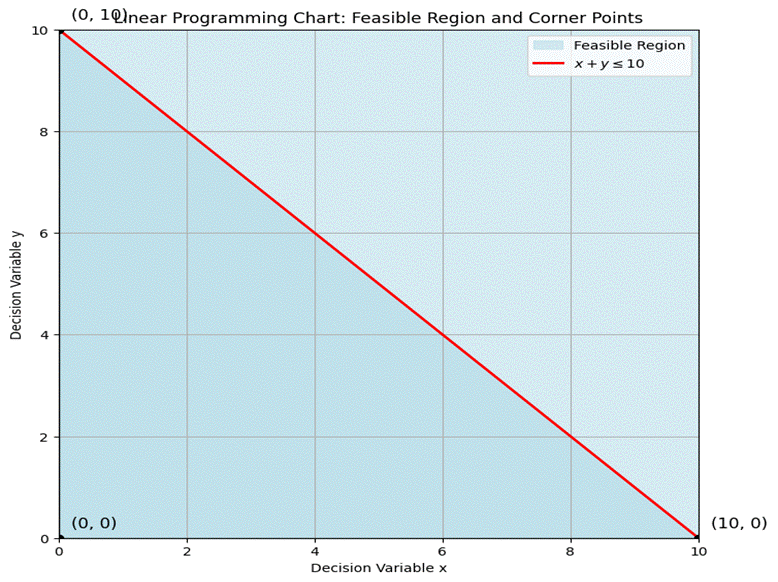
On a chart, the x-axis usually represents one decision variable (like pens to buy), and the y-axis represents the other (like notebooks). Each constraint from a problem is plotted step by step. For example, if x + y ≤ 10, draw the line x + y = 10 and shade the area below it. Repeat for other constraints to see where all shaded areas overlap. This overlap is called the feasible region, the area where all rules are satisfied.
Corner points of this feasible region are crucial because the optimal solution lies at one of them. Students can evaluate the objective function at each corner point to find the maximum or minimum value. Visual representation not only makes the problem intuitive but also reduces calculation mistakes, helping learners gain confidence in solving linear programming problems.
Solved Linear Programming Problems for Students
Practising linear programming problems helps students become confident and exam-ready. Step-by-step examples show how to convert word problems into equations, draw feasible regions, and find optimal solutions.
Problem 1: Maximisation Problem
A student sells pens and notebooks. Each pen earns $2, and each notebook earns $3. The student can sell at most 10 items in total. Let x = pens, y = notebooks. Objective function: Maximise Z = 2x + 3y. Constraints: x + y ≤ 10, x ≥ 0, y ≥ 0. Plot the feasible region. Corner points: (0,10), (10,0), (0,0). Evaluate Z: Z(0,10) = 30, Z(10,0) = 20. Maximum Z = 30 at (0,10).
Problem 2: Minimisation Problem
A factory wants to minimise cost while producing chairs (x) and tables (y). Cost per chair = $5, per table = $8. Constraints: x + y ≥ 10 (minimum production), x ≤ 8, y ≤ 6, x ≥ 0, y ≥ 0. Objective function: Minimise C = 5x + 8y. Corner points evaluated: (4,6), (8,2). Minimum cost C = 64 at (4,6).
Problem 3: Word Problem Converted into Equations
A student has 24 hours to study Maths (x) and Science (y). Maths takes 1 hour per chapter, Science takes 2 hours. Constraint: x + 2y ≤ 24. Objective: Maximise chapters completed, Z = x + y. Corner points: (0,12), (24,0), (0,0). Evaluate Z: Max Z = 24 at (24,0).
Tips for Students
Always define variables clearly.
- Draw clear linear programming charts for accuracy.
- Label axes, constraints, and corner points neatly.
Show step-by-step evaluation of the objective function.
Help your child crack word problems and maximise or minimise outcomes with fun, step-by-step lessons. Learn linear programming charts and strategies interactively with PlanetSpark. Join PlanetSpark today and build strong maths foundations!
How PlanetSpark Makes Linear Programming Easy?
Linear programming can feel overwhelming to school students at first, with graphs, constraints, and optimisation all at once. PlanetSpark changes this experience by making learning calm, logical, and confidence-driven. Instead of rushing into formulas, students are guided to understand the idea behind every step.
Lessons are designed to match a student’s school level and pace, ensuring clarity before complexity. By combining structured thinking, visual learning, and interactive discussion, PlanetSpark helps students move from confusion to confidence through the following ways:
Concept-first learning approach
PlanetSpark begins with why a concept works, not just how. Students first understand real-life situations behind linear programming problems before converting them into equations.
Breaking complex problems into simple steps
Large word problems are divided into small, manageable steps, decision variables, constraints, graphs, and solutions, so students never feel lost.
Visual and chart-based explanation methods
Graphs, shaded regions, and corner points are explained visually, helping students clearly understand feasibility and optimisation instead of memorising procedures.
Confidence-building problem discussions
Students actively discuss solutions with mentors, ask questions freely, and correct mistakes in a supportive environment that builds exam confidence.
Focus on reasoning, not rote learning
Instead of memorising formulas, students learn to justify each step logically, an essential skill for school exams.
Helping students explain their answers clearly
PlanetSpark trains students to write neat, well-structured solutions and explain their reasoning clearly, improving both marks and mathematical communication skills.
Conclusion
Linear programming helps students build logical thinking, structured problem-solving skills, and exam confidence. With clear concepts and guided practice, this topic becomes manageable and even enjoyable.
From basic equations to confident problem-solving, PlanetSpark ensures students understand linear programming concepts deeply, not just memorise formulas. Enrol for a free demo today and experience clear conceptual learning!
PlanetSpark acts as a supportive learning partner, helping students understand maths deeply, practise confidently, and express solutions clearly. Our expert educators turn complex problems into achievable wins for your little one.
Frequently Asked Questions
Linear programming is a method of finding the best possible outcome, like maximum marks or minimum time, when there are certain limits. It teaches students how to choose wisely using equations, graphs, and logical thinking.
Linear programming trains students to think analytically and organise information step by step. It strengthens logical reasoning, improves graph interpretation, and prepares learners for higher-level maths, economics, and decision-making problems commonly seen in exams.
A linear programming chart helps students visualise constraints clearly. By plotting equations on graphs, learners can easily identify the feasible region and corner points, making it simpler to choose the correct optimal solution with confidence.
Linear programs may seem challenging at first, but with concept-based learning and guided practice, it becomes approachable. Breaking problems into steps and practising linear programming problems regularly helps beginners gain clarity and confidence.
PlanetSpark uses a concept-first approach, visual explanations, and interactive discussions to simplify complex topics. Students learn the “why” behind each step, making maths easier to understand and remember.
Yes. Through personalised guidance, regular practice, and supportive feedback, PlanetSpark helps students gain confidence in solving problems independently and explaining their answers clearly, both in exams and beyond.