
Best STEM Apps for Kids: Turn Screen Time Into Skill Time
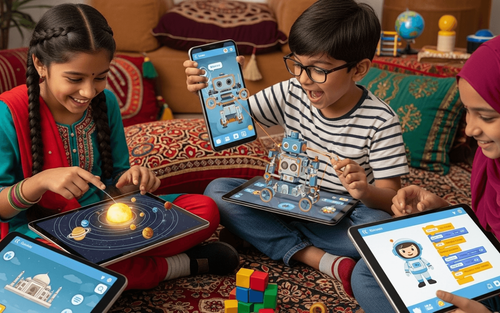

Your child begs for screen time. You say yes, then feel guilty as you watch them mindlessly scroll or play repetitive games.
What if screen time could actually build skills?
Not just "educational" in only the name, but genuinely interactive experiences that teach science, technology, engineering, and maths through play, exploration, and problem-solving.
Here's the reality: STEM apps, when chosen wisely, transform passive screen time into active learning.
Kids code robots. Build virtual circuits. Explore the solar system. Solve math puzzles. Engineer bridges. Conduct experiments all through interactive apps that feel like games but build real skills.
The difference between a good STEM app and a mediocre one? Interactivity.
Watching videos? Passive.
Answering multiple-choice questions? Mildly engaging.
Building, creating, experimenting, problem-solving? That's where learning happens.
This guide breaks down the best STEM apps across categories: coding, math, science, and engineering, with age recommendations and what makes each one worth your child's time (and your money).
Let's turn screen time into skill-building time.
Age-Appropriate Best STEM Apps By Category
Here are the top-rated, genuinely interactive STEM apps organised by subject.
Coding & Programming
1. Scratch Jr. (Ages 5-7)
What it is: Visual programming for young kids. Drag-and-drop blocks to make characters move, jump, and interact.
Why it's great: No reading required, kids create stories and games while learning sequencing and logic.
Price: Free
Interactivity: High. Kids design and build their own projects.
2. Tynker (Ages 7-14)
What it is: Gamified coding platform. Kids progress through levels, building games, apps, and mods for Minecraft.
Why it's great: Feels like gaming, teaches real coding concepts (loops, conditionals, variables).
Price: Free version available; premium subscription ~$10/month
Interactivity: Very high. Kids code functional games and animations.
3. Swift Playgrounds (Ages 10+)
What it is: Apple's coding app teaching Swift (a real programming language).
Why it's great: Kids solve puzzles by writing code that makes characters move through 3D worlds.
Price: Free
Interactivity: Extremely high. Real coding with immediate visual feedback.
4. Code.org (Ages 4-18)
What it is: Free coding courses from block-based (young kids) to text-based (teens).
Why it's great: It's comprehensive, scaffolded, and includes popular themes (Minecraft, Star Wars).
Price: Free
Interactivity: High. Hands-on coding challenges and creative projects.

Mathematics Apps
5. Prodigy Math (Ages 6-14)
What it is: A math game where kids battle creatures by solving math problems.
Why it's great: Adaptive difficulty. Curriculum-aligned. Feels like an RPG game.
Price: Free version; premium ~$10/month
Interactivity: High. Gameplay is driven by math problem-solving.
6. DragonBox Series (Ages 4-12)
What it is: Math concepts (algebra, geometry, and numbers) taught through puzzles and games.
Why it's great: Teaches math intuitively. Kids learn without realising they're doing math.
Price: ~$5-8 per app
Interactivity: High. Puzzle-solving with immediate feedback.
7. Khan Academy Kids (Ages 2-8)
What it is: Comprehensive early learning app covering math, reading, and logic.
Why it's great: Free, high-quality, adaptive, and no ads.
Price: Free
Interactivity: Moderate to high. Mix of activities, stories, and games.
Science Apps
8. Toca Lab Series (Ages 6-12)
What it is: Experiment with elements, observe reactions, and discover the periodic table through play.
Why it's great: Open-ended exploration. No instructions, just experiment and learn.
Price: ~$4-5 per app
Interactivity: Very high. Pure experimentation.
9. The Human Body by Tinybop (Ages 6-12)
What it is: Interactive anatomy app. Kids explore body systems (skeletal, muscular, nervous, etc.).
Why it's great: Beautifully designed, kids tap, drag, and interact to see how the body works.
Price: ~$3
Interactivity: High. Touch and explore every system.
10. NASA App (Ages 8+)
What it is: Explore space missions, view real NASA images, watch launches, and read about discoveries.
Why it's great: Real science from a real space agency. Inspiring and educational.
Price: Free
Interactivity: Moderate. Exploration and discovery focused.
11. Seek by iNaturalist (Ages 6+)
What it is: Use your camera to identify plants, animals, and fungi in real life.
Why it's great: Combines real-world exploration with app-based learning. Encourages outdoor time.
Price: Free
Interactivity: Very high. Requires real-world observation.
Engineering & Design Apps
12. Minecraft Education Edition (Ages 7+)
What it is: Minecraft with lesson plans. Build structures, solve problems, and learn chemistry, math, and history.
Why it's great: Open-ended creativity meets curriculum-aligned challenges.
Price: Subscription required; often available through schools
Interactivity: Extremely high. Building, problem-solving, collaborating.
13. Simple Machines by Tinybop (Ages 6-12)
What it is: Explore levers, pulleys, wheels, and inclined planes through interactive experiments.
Why it's great: Kids see how machines work by manipulating them directly.
Price: ~$3
Interactivity: High. Hands-on manipulation and experimentation.
14. Inventioneers (Ages 8-14)
What it is: Physics-based puzzle game. Use inventions (fans, magnets, ropes) to solve challenges.
Why it's great: Teaches cause-effect, physics, and problem-solving through trial and error.
Price: Free version; full version ~$2
Interactivity: Very high. Building and testing solutions.
Multi-Subject STEM Apps
15. Osmo (Ages 5-12)
What it is: Physical-digital hybrid. Kids use physical pieces; the iPad camera reads them and responds.
Why it's great: Combines tactile learning with digital feedback. Covers coding, math, drawing, and spelling.
Price: Requires Osmo base (~$40) + app bundles
Interactivity: Extremely high. Physical manipulation with digital response.
16. Explain Everything (Ages 8+)
What it is: Digital whiteboard for creating presentations, animations, and explanations.
Why it's great: Kids CREATE content, not just consume. Teaches communication + STEM.
Price: Free version; premium ~$6/month
Interactivity: High. Creation and design focused.
Why STEM Apps Matter
They Build Future-Ready Skills
The future job market demands STEM literacy. Coding, data analysis, problem-solving, and logical thinking. And these are not optional anymore. STEM apps introduce these concepts early, making them accessible and fun.
They Make Abstract Concepts Concrete
How do you explain gravity to a 7-year-old? Show them. How do you teach coding logic? Let them build something that works (or breaks), and they debug it. Interactive apps turn abstract ideas into hands-on experiences.
They Offer Personalised Learning
Good STEM apps adapt to your child's level. Too easy? The app increases difficulty. Struggling? It offers hints and scaffolding. This personalised pacing keeps kids challenged without frustration.
They Build Confidence Through Trial and Error
STEM apps create safe spaces to fail. Kids experiment, make mistakes, learn, and try again without judgment. This builds resilience and a growth mindset.
They're Accessible Anytime, Anywhere
No lab equipment needed. No expensive kits. Just a device and curiosity. STEM apps democratize access to quality STEM education.
What Makes a STEM App Truly Interactive?
Not all "educational" apps are created equal. Here's what separates the great from the mediocre.
Hands-On Problem-Solving
Good: Kids create, build, code, and experiment.
Bad: Kids watch videos or answer multiple-choice questions.
Example: Coding a game (interactive) vs. watching someone else code (passive).
Immediate Feedback
Good: Kids see results instantly and can adjust.
Bad: Delayed or vague feedback.
Example: Building a bridge in an engineering app, it either holds or collapses immediately. Kids see cause and effect.
Open-Ended Exploration
Good: Multiple solutions, creative freedom.
Bad: One correct answer, rigid structure.
Example: Minecraft Education Edition (build anything) vs. drill-and-kill math apps (one right answer).
Progressive Challenge
Good: Starts easy, gradually increases difficulty.
Bad: Too hard, too fast, or stays too easy.
Example: Apps that adapt to skill level vs. static difficulty.
Real-World Application
Good: Kids see how concepts apply to real life.
Bad: Abstract learning with no context.
Example: Apps showing how coding creates real apps/games vs. abstract logic puzzles with no purpose.
How to Choose the Right STEM App
With thousands of apps available, how do you pick?
Ask These Questions
1. Is it truly interactive? Does your child create, build, experiment, or just watch and tap?
2. Does it adapt to skill level? Does it stay challenging without being frustrating?
3. Is it aligned with learning goals? What specific skill are you hoping to build?
4. Is it age-appropriate? Too easy = boring. Too hard = frustrating.
5. Is it worth the price? Free doesn't always mean good. Sometimes $3-5 apps are far superior to free ad-filled alternatives.
6. Does it encourage creativity or just consumption? Creation is greater than consumption every time.
Red Flags to Avoid
❌ Excessive ads (distracting and manipulative)
❌ In-app purchases targeting kids
❌ Passive watching with minimal interaction
❌ No clear educational goal
❌ One-size-fits-all difficulty (no adaptation)
Try Before You Buy
Many paid apps offer free versions or trials. Test them first.
Watch your child use it:
- Are they engaged or zoned out?
- Are they frustrated or challenged appropriately?
- Are they learning or just clicking randomly?
Screen Time + Learning: Finding Balance
STEM apps are better than mindless games, but balance still matters.
The 80/20 Rule
80% of screen time: Interactive, educational, creative 20% of screen time: Entertainment, relaxation
Not every screen minute must be "productive." Downtime matters too.
Combine Digital and Physical STEM
Example:
- Use a coding app, THEN build a physical robot
- Explore anatomy on iPad, THEN draw the human body
- Learn about bridges in an app, THEN build one with straws
Why: Digital introduces concepts. Physical cements understanding.
Set Time Limits Even for "Good" Apps
Educational screen time is still screen time. Balance with:
- Outdoor play
- Reading physical books
- Face-to-face conversation
- Creative offline activities
How PlanetSpark Complements Digital STEM Learning
STEM apps are powerful. But they are just one piece of the puzzle.
What Apps Can't Teach
- Communication skills: Articulating ideas verbally
- Collaboration: Working with others in real time
- Presentation skills: Sharing knowledge confidently
- Critical thinking discussions: Debating ideas with peers
This is where PlanetSpark steps in.
Live, Interactive Learning
While apps offer self-paced learning, PlanetSpark provides:
- Real-time feedback from expert teachers
- Collaborative projects with peers
- Public speaking practice (presenting STEM concepts)
- Creative expression (storytelling, debates, communication)
STEM + Communication = Complete Skill Set
Knowing how to code is valuable. Knowing how to code AND explain your project? That's powerful.
PlanetSpark ensures kids don't just learn; they learn to communicate what they know.
STEM apps are not just screen time. They are skill-building times.
When chosen wisely, they transform tablets and phones from distraction devices into learning labs where kids code, experiment, solve problems, and create.
The key is interactivity.
Not watching. Not passive clicking. But genuine hands-on exploration where kids build, test, fail, learn, and try again.
Start with 2-3 apps from this list. Try them with your child. See what sparks their curiosity.
Then balance digital learning with physical projects, outdoor play, and real-world application.
Because the best STEM education is not purely digital or purely analogue. It's a thoughtful blend of both.
Give your child tools to explore, create, and discover. Whether through an app, a kit, or a conversation, curiosity is the real curriculum.
If you are a curious head, you may benefit from the suggested articles.
Impact of Technology on Children: Present and Future
Frequently Asked Questions
It depends on the app. Truly interactive apps that require problem-solving, creativity, and hands-on building ARE educational. Passive watching or repetitive clicking is just screen time.
As young as 4-5 with age-appropriate, play-based apps like Scratch Jr. and Khan Academy Kids. Always supervise and balance with offline activities.
Yes, but with flexibility. Interactive, educational screen time can have slightly more lenient limits than passive entertainment, but balance still matters.
Sometimes, Code.org, Khan Academy Kids, and NASA are excellent free options. But some paid apps ($3-10) offer ad-free, deeper experiences worth the investment.
Watch your child use it. Are they engaged and thinking? Can they explain what they learned? Do they want to apply it offline? Those are good signs.
No. They're supplements, not replacements. Best results come from combining apps with hands-on projects, books, real-world exploration, and teacher/parent guidance.
Start with gamified STEM apps (Prodigy Math, Tynker, Minecraft Education). They feel like games but build real skills. Gradually introduce variety.
Ages 5-8: 30-45 minutes, Ages 9-12: 45-60 minutes, Ages 13+: 60-90 minutes. Always balance with offline activities.