
Teaching Kids About Strong Passwords: A Complete Parent Guide
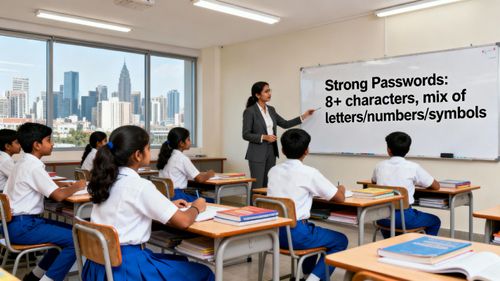

Table of Contents
- Why Teaching Kids About Strong Passwords Matters in Today’s
- Understanding the Growing Digital Exposure of Children
- What Really Makes a Strong Password? Explaining It Simply to
- How to Teach Children the Importance of Passwords
- Breaking Down the Elements of a Strong Password for Kids
- Using Passphrases: The Best Child-Friendly Method
- Teaching Kids About Password Managers
- Addressing Common Mistakes Kids Make With Passwords
- How Parents Can Support Kids in Building Secure Digital Habi
- Teaching Kids About Strong Passwords Through School Curricul
- PlanetSpark Public Speaking Course: Building Confident and D
- A Powerful Digital Future Begins With Simple Habits
Children today grow up surrounded by screens, apps, and online platforms that are as much a part of their daily routine as homework and playtime. Whether they are attending online classes, logging into learning portals, playing interactive games, or watching their favourite shows, one thing quietly protects every digital doorway they enter: a password. Yet, most children treat passwords casually, choosing simple combinations, reusing the same one everywhere, or even sharing them with friends without understanding the risks.
That is why Teaching Kids About Strong Passwords has become a foundational life skill in the digital age. Kids may not realise it, but their school assignments, personal information, photos, and online identities all depend on how secure their passwords are. As parents and educators, it is our responsibility to turn password safety into a child-friendly, engaging, and easy-to-understand habit.
This blog will help you do exactly that. Through practical tips, relatable examples, fun activities, and simple explanations, you will learn how to raise digitally responsible, confident, and cyber-smart children.
Why Teaching Kids About Strong Passwords Matters in Today’s Digital Age
Teaching Kids About Strong Passwords is not just a tech lesson, it is a crucial life skill for modern-day children growing up in a hyper-connected world. With learning apps, school portals, online games, virtual classrooms, and digital entertainment forming a major part of their daily routine, kids end up creating multiple online accounts before they even understand the meaning of online privacy. Without guidance, most children pick predictable passwords, share them easily, or store them in unsafe ways.
This makes them vulnerable to:
Unauthorised account access
Identity misuse
Loss of school assignments or digital work
In-app purchases being made without permission
Exposure to unsafe interactions
Privacy breaches
When parents and educators introduce password safety early, kids not only become secure internet users but also grow into responsible, confident digital citizens who make smart decisions online.
Understanding the Growing Digital Exposure of Children
Today’s children use more digital platforms than any previous generation. Whether it’s studying, playing, or exploring hobbies, everything happens online.
Common Online Touchpoints for Children
Kids regularly interact with:
Online learning portals
Educational apps
Virtual classrooms
Gaming platforms
Media streaming apps
Kids’ social communities
School submission portals
Email accounts
Coding or hobby-based websites
Every login requires:
a username
a password
personal data
privacy settings
digital responsibility
This creates a digital footprint at a very early age. With increased usage comes increased responsibility.
Why Kids Need Awareness Early
Children often believe passwords are “just another step” in using an app. They may not realise that a weak password:
Can be guessed by classmates
Can compromise their online identity
Can expose private photos or messages
Can lead to game progress or digital rewards being lost
Can allow strangers to enter digital spaces meant for kids
Teaching them password hygiene early helps them:
protect privacy
develop responsibility
think critically
become independent digital users
How Kids’ Behaviour Makes Them More Vulnerable
Common child habits that create risks:
Using the same password everywhere
Choosing simple words for convenience
Saving passwords on shared school devices
Storing passwords in notebooks
Sharing passwords with friends
Logging in on public Wi-Fi
These must be replaced with safer habits through consistent awareness.
What Really Makes a Strong Password? Explaining It Simply to Kids
Password rules can feel confusing for kids if explained in adult terms. The key is to simplify them using fun analogies and relatable concepts.
Explaining Passwords Through Fun Analogies
Try these comparisons:
A strong password is like a superhero shield, thick, strong, and impossible to break.
A weak password is like a paper shield, one touch and it tears.
A password is the key to your digital room, if you share it, anyone can walk in.
Ingredients of a Strong Password
A strong password should:
Be 12–16 characters
Use uppercase + lowercase letters
Include numbers + symbols
Be unique for every login
Be impossible to guess
Teach Kids What NOT to Use
Avoid passwords based on:
name
birthday
pet name
favourite character
school name
simple patterns like “1234”
Introduce Fun Passphrases
Passphrases help kids make long, memorable passwords.
Examples:
RedBalloonRunsFast32
TimeToReadMagicBooks2024
RobotsJumpOverRainbows99
Sunset!On!Saturday#9
Explain like this:
“You’re not making a password, you’re creating a secret sentence only you can decode.”
How to Teach Children the Importance of Passwords
Teaching Kids About Strong Passwords is most effective when it feels fun, practical, and hands-on.
1. Explain Passwords as Digital Keys
Kids already understand physical security. Connect it to digital safety.
Tell them:
“Your password is the key to your digital home. You wouldn’t give your house key to everyone, right?”
2. Teach Privacy in Online Spaces
Make children aware that digital spaces are personal too.
Explain:
Not everyone online is trustworthy
Passwords protect personal information
Sharing login details can cause problems
Safe online behavior is a habit
Use the concept of digital hygiene to reinforce these points.
3. Use Real-Life Stories They Can Relate To
Weak Password Story
A child uses “cat123”. A classmate guesses it easily, logs in, changes characters in a game, and creates stress.
Strong Password Story
A child uses “RiverRunsFastNight2024!”
No one can guess it. Their progress and privacy stay safe.
Stories allow kids to understand consequences without fear.
4. Turn Password Learning Into Fun Activities
Kids learn best when they enjoy the process. Try:
Password-building races
Strong vs weak password sorting games
Dice-based password creators
Flashcards with security rules
Treasure hunts with coded clues
Random word generators
“Create a passphrase from your favourite story” activity
5. Teach the “Never Share Passwords” Rule
Children may share passwords out of trust, excitement, or fun.
Explain clearly:
“Your password is private. Only you and your parents should know it.”
Reasons why:
A friend may share it further
Devices may get lost
Accounts can be misused
Work or game data can be deleted
6. Teach Why Passwords Should Be Changed Regularly
Use analogies kids understand:
“Just like you get new notebooks each year, your passwords also need updating.”
Benefits of regular updates:
Clears old risks
Makes accounts safer
Builds responsibility
Protects from guessing attempts
Breaking Down the Elements of a Strong Password for Kids
Help children understand that strong passwords follow simple rules.
A Strong Password Must:
Be long
Be unique
Use mixed characters
Avoid personal info
Avoid repetition
Stay private
Using Passphrases: The Best Child-Friendly Method
Examples kids love:
MagicUnicornJumpsHigh2024
IWillRead10BooksThisYear
BlueStarsShineAtNight88
PizzaIsMySuperPower11
Teach the Passphrase Formula
Pick two fun objects
Add an action word
Add numbers or symbols
Example:
Sunflower + Flies + High + 21 → SunflowerFliesHigh21!
Teaching Kids About Password Managers
Older children can benefit from password managers.
Explain it simply:
“It’s a treasure box that stores all your passwords safely. You only remember one big key.”
Parents should:
Choose a safe password manager
Guide children through setup
Enable two-factor authentication
Monitor usage
Addressing Common Mistakes Kids Make With Passwords
Kids often repeat the same mistakes because they value convenience.
1. Using Personal Info
Avoid:
Birthday
Pet name
Sibling name
Favourite cartoon
School name
Anyone can guess these easily.
2. Using the Same Password Everywhere
Explain:
“If one door opens, all doors open.”
Teach:
One password = one account.
3. Writing Passwords Down
Kids write passwords on:
notebooks
sticky notes
school diaries
notes apps
Explain why this is unsafe.
Encourage:
memorising passphrases
using a password manager
4. Sharing Passwords with Friends
Children trust too easily.
Explain risks:
Deleted progress
Changed account settings
Accidental purchases
Misuse of digital identity
Teach the rule:
“Passwords are private forever.”
How Parents Can Support Kids in Building Secure Digital Habits
Parents shape a child’s digital behaviour more than any app or teacher.
1. Create Family Password Rules
Post them somewhere visible.
Rules can include:
Minimum length: 12 characters
Must use passphrases
No sharing
Regular updates
No personal information
2. Practice Password Creation Together
Kids copy adults.
Try:
Weekly family password-building time
Checking password strength together
Reviewing privacy settings
Discussing real-world digital risks
3. Build a Digital Responsibility Routine
A weekly routine may look like:
Sunday: Update an old password
Monday: Discuss online safety
Tuesday: Check privacy settings
Wednesday: Review apps used
Thursday: Delete unused accounts
This keeps digital hygiene consistent.
4. Encourage Kids to Ask Questions
Help kids explore:
Why passwords matter
How hackers guess passwords
What happens if someone enters their account
How privacy keeps them safe
Curiosity builds long-term awareness.
Teaching Kids About Strong Passwords Through School Curriculum
Schools play an essential role in developing digital fluency.
1. Classroom Activities That Make Learning Fun
Teachers can conduct:
Strong password workshops
Weak vs strong password comparisons
Group games
Privacy discussions
Digital ethics seminars
2. Collaborative Learning Builds Confidence
Kids can work in groups to:
Build password posters
Create passphrases
Reflect on digital safety
Participate in team competitions
3. Age-Appropriate Digital Education
Young children (6–9 years)
Use analogies
Teach privacy basics
Focus on “don’t share passwords”
Pre-teens (10–13 years)
Introduce password rules
Teach privacy settings
Explain complexity
Teens (14+)
Introduce encryption basics
Explain multi-factor authentication
Encourage password managers
Teach ethical responsibility
PlanetSpark Public Speaking Course: Building Confident and Digitally Smart Kids
PlanetSpark’s Public Speaking Course is designed to help children communicate confidently, think critically, and express ideas with clarity. These skills significantly enhance their understanding of concepts like online safety, password creation, and digital responsibility.
1:1 Public Speaking Coaching by Communication Experts
Every child receives personalized coaching from certified trainers who understand child psychology and communication. Individual sessions provide custom feedback and ensure continuous improvement.
Step-by-Step Skill Building Across Modules
The curriculum covers:
Body Language
Voice Modulation
Speech Structuring
Storytelling
Persuasive Techniques
Extempore Speaking
Debating Skills
Children learn to use expressions, gestures, tone, and structured content effectively. They also practice debating skills such as rebuttals, counterarguments, respectful disagreement, logical reasoning, and the use of ethos, pathos, and logos.
TED-Style Training Modules
Kids are trained to create impactful speeches with a strong hook, clear message, story, and call-to-action. This helps them convey ideas confidently in any real-world situation.
Real-Time Practice With Global Peers
Children from 13+ countries participate in:
Live debates
Panel discussions
Storytelling circles
Group activities
This exposure helps them observe, learn, and collaborate on a global learning stage.
Video Feedback Loop and AI Tools
PlanetSpark provides detailed performance reports using AI analysis tools that measure:
pauses
clarity
body language
grammar
structure
vocal projection
Children also receive video recordings of their speeches to self-assess and improve.
1:1 Personal Trainers
Trainers focus on developing fluency, grammar, creative writing, and confidence. The personalized mentorship accelerates learning and keeps children motivated.
SparkX – AI-Enabled Video Analysis Tool
SparkX evaluates:
voice clarity
posture
grammar
idea flow
confidence
Parents receive a detailed improvement report after every activity.
AI-Led Practice Sessions
Kids receive instant feedback on:
voice
fluency
pacing
grammar
pronunciation
This builds consistency and self-awareness.
Spark Diary
Kids write:
daily reflections
poems
stories
speeches
This enhances creativity, writing clarity, and expression.
A Powerful Digital Future Begins With Simple Habits
Teaching Kids About Strong Passwords is more than a digital rule, it is the first step toward raising confident, responsible, and future-ready children. In a world where every click creates a digital imprint, password safety becomes the foundation of online awareness. When children learn to protect their accounts, respect digital boundaries, and understand privacy, they begin developing a mindset rooted in responsibility and independence. These habits shape them into thoughtful decision-makers who know how to navigate technology safely and smartly.
But knowledge alone isn’t enough. Children must also learn to express what they know, share ideas confidently, and communicate their understanding of digital safety with clarity. That’s where PlanetSpark plays a powerful role. Through structured public speaking, storytelling, and critical thinking sessions, PlanetSpark helps your child become articulate, aware, and digitally empowered.
You may also read:
Frequently Asked Questions
Because kids use digital platforms early, strong passwords protect their accounts, privacy, and learning spaces.
Children can begin learning simple password concepts as early as 5–6 years old.
Use analogies like real-life keys, superhero shields, or treasure boxes.
Older children can, under parental guidance, to manage multiple secure passwords.
Every 3–6 months or whenever an account feels unsafe.