
Do’s and Don’ts of Virtual Background and Lighting

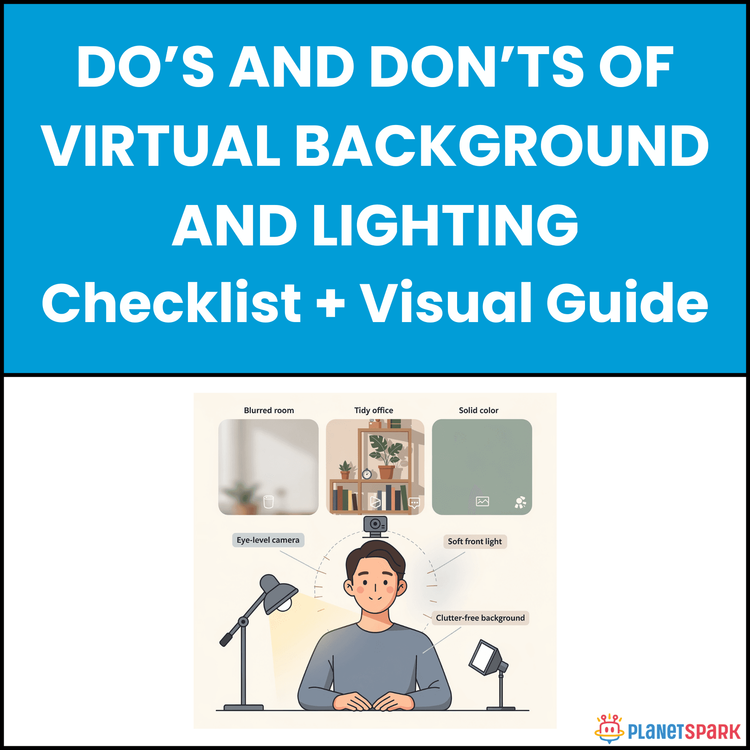
Do’s and Don’ts of Virtual Background and Lighting
Set Up a Professional Virtual Background and Lighting for Video Interviews and Remote Meetings
In today’s hybrid work environment, your video presence is your professional presence.
Within the first few seconds of joining a virtual interview or client meeting, people are already forming impressions—about your credibility, attention to detail, and professionalism. And most of that judgment has nothing to do with what you say. It comes from what they see.
Poor lighting, cluttered backgrounds, awkward camera angles, and glitchy virtual backdrops silently undermine strong professionals every day. If you’ve ever felt that your ideas were better than the impression you created on screen, this resource exists for you.
The “Do’s and Don’ts of Virtual Background and Lighting” guide is a complete, practical checklist designed to help working professionals master on-camera presence without expensive equipment or complex technical knowledge.
Who Is This Resource For?
This guide is especially valuable for:
- Job seekers preparing for virtual interviews
- Career switchers and mid-level professionals attending panel interviews
- Consultants and coaches conducting client-facing video calls
- Managers leading remote or hybrid teams
- Sales professionals pitching over Zoom or Teams
- Educators and trainers delivering online sessions
- Anyone working remotely who wants to look more polished and credible on camera
Whether you are early in your career or operating at a senior level, your visual setup influences how seriously people take you.
What Does This Resource Contain?
This is not a generic “look professional on Zoom” article. It is a structured, actionable toolkit that includes:
1. Virtual Background Fundamentals
- When to use virtual backgrounds
- When to show your real space
- How to decide what enhances (or hurts) your message
2. Virtual Background Do’s and Don’ts
- How to choose simple, professional images
- Why image resolution and sizing matter
- Common mistakes like busy patterns, novelty backdrops, and glitching edges
- Frame positioning guidelines for head-and-shoulders presence
3. Real Background Best Practices
- How to arrange bookshelves, plants, artwork, and credentials
- What to remove (personal photos, clutter, visual noise)
- How to create depth by positioning yourself correctly
4. Professional Lighting Principles
- A simplified explanation of three-point lighting (key, fill, back light)
- How to use natural light strategically
- Why front-facing light matters more than camera quality
- Ideal light positioning (45-degree angle, eye-level placement)
5. Lighting Do’s and Don’ts
- Avoiding backlighting from windows
- Why overhead light alone creates harsh shadows
- How to match colour temperature (no mixing warm and cool tones)
- Why laptop screen glow is not real lighting
6. Equipment Recommendations by Budget
- Budget-friendly setup (₹2,000–5,000)
- Mid-range professional setup (₹8,000–15,000)
- Premium client-facing setup (₹25,000–50,000)
7. Pre-Meeting Setup Checklist
- Background verification
- Lighting assessment
- Camera positioning
- Audio and internet checks
- Professional appearance verification
- Notification control
8. Troubleshooting Common Problems
- Halo effects and pixelation in virtual backgrounds
- Face appearing dark while background is bright
- Unflattering shadows
- Unnatural skin tones
- Bandwidth-related video quality drops
9. Industry-Specific Setup Guidance
- Corporate & finance
- Creative & design
- Consulting & coaching
- Education & training
- Sales & business development
- Healthcare & wellness
10. Personal Setup Worksheet
- A structured template to document your optimal configuration
- Camera position, lighting placement, background choice
- Platform settings
- Troubleshooting notes
- Maintenance schedule
11. Real Before-and-After Case Studies
- How small changes (₹3,500–4,000 investments) dramatically improved perceived professionalism
This guide moves beyond theory. It gives you a repeatable system.
Summary of the Resource
If you are short on time, here’s the essence:
- Lighting matters more than camera quality.
- Front-facing light at eye level transforms how you look instantly.
- Simple backgrounds outperform “creative” ones in professional settings.
- Your setup communicates credibility before you speak.
- Fifteen minutes of structured pre-meeting preparation prevents most on-camera disasters.
- Small, consistent improvements compound into strong executive presence.
This resource helps you go from “just visible” to “confident and polished.”
How Will This Resource Be Useful?
This guide delivers tangible, real-world benefits:
1. Stronger First Impressions
Viewers form judgments within seconds. A clean background and even lighting create instant credibility.
2. Increased Confidence on Camera
When you know you look professional, you focus on content instead of worrying about appearance.
3. Better Client and Interview Outcomes
In high-stakes settings, visual professionalism reinforces your authority and competence.
4. Reduced Technical Stress
The troubleshooting and pre-meeting checklist prevent last-minute panic.
5. Consistent Professional Brand
Using the same setup across platforms builds visual consistency and recognisability.
6. Faster Setup for Important Calls
Once you document your ideal configuration, you eliminate guesswork.
Your virtual environment becomes a strategic asset instead of an afterthought.
How Should You Use This Resource?
To get maximum value, follow this phased approach:
Step 1: Full Read-Through
Read the guide once completely to understand core principles—background selection, lighting positioning, and camera psychology.
Step 2: Immediate Audit
Open your camera preview and assess your current setup against the checklists. Identify the single biggest weakness (usually lighting or clutter).
Step 3: Implement One Improvement
Do not try to fix everything at once. Adjust window position, add a lamp, declutter shelves, or correct camera height.
Step 4: Test Under Real Conditions
Join a test call. Record yourself speaking for 60 seconds. Evaluate lighting, framing, and background balance.
Step 5: Complete the Personal Setup Worksheet
Document your optimal configuration so you can replicate it consistently.
Step 6: Use the Pre-Meeting Checklist
Before every important call, spend 10–15 minutes verifying lighting, background, audio, and camera position.
Step 7: Refine Quarterly
As your role evolves or equipment changes, update your setup intentionally.
Professional virtual presence is not a one-time decision. It is a skill that improves with refinement.
Action Steps
If you want immediate impact:
1. Face a window instead of sitting with it behind you.
2. Raise your camera to eye level using books or a stand.
3. Remove visible clutter from your background.
4. Turn off overhead lights and add front-facing illumination.
5. Test your setup by recording a 60-second introduction.
6. Choose one improvement to implement this week.
Small changes produce visible transformation.
Your ideas deserve to be heard without distraction.
In a world where interviews, promotions, client pitches, and leadership conversations increasingly happen on screen, your setup is part of your professional skillset.
You do not need expensive studio equipment. You need clarity, structure, and consistency.
This guide gives you exactly that.
Professional presence is not accidental. It is designed.
Start refining yours today.
Book your free session today!