
Screen Time Rules for Families: 10 Boundaries That Stick
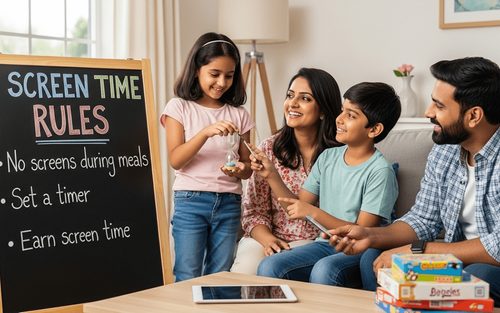

Table of Contents
It's 7 PM. You told your child "10 more minutes" half an hour ago.
They're still glued to the tablet.
You're tired of repeating yourself.
They whine when you finally take it away.
Everyone's frustrated.
Sound familiar?
Screen time battles are exhausting. And most family rules don't work because they're either too strict (leading to rebellion), too vague (leading to constant negotiation), or inconsistently enforced (leading to confusion).
Here's the truth: screens aren't evil.
But unlimited, unstructured screen time? That genuinely harms development: attention spans shrink, sleep suffers, family connections weaken, and physical activity disappears.
The good news? You don't need a PhD in parenting to create screen time rules that work. You need clarity, consistency, and a few practical strategies that fit real family life.
This guide gives you 10 proven rules: simple, enforceable, and designed for busy parents navigating the digital age.
10 Screen Time Rules That Actually Work
Here are practical, enforceable rules real families use to limit screen time successfully.
Rule 1: Screen-Free Zones
Clear on certain spaces always being screen-free, no negotiation.
Common screen-free zones:
- Dining table (all meals)
- Bedrooms (especially at night)
- Car rides under 30 minutes
Why it works: Clear boundaries reduce decision fatigue. You're not deciding, "Can I use my iPad at dinner?" every day. The answer is always no.
How to enforce: Make it a family rule (adults included). Store devices in a central charging station at night.
Rule 2: Screen-Free Times
Define specific times of the day when screens are not allowed.
Examples:
- First hour after waking up
- During homework time
- Two hours before bedtime
- During family activities
Why it works: Protect critical times, set the tone in the mornings, affect sleep at bedtime, and build connection during family time.
How to enforce: Set phone alarms as reminders. Create a visual schedule for younger kids.
Rule 3: Earn Screen Time Through Activities
Screen time isn't automatic. It's earned through non-screen activities.
Examples:
- 30 minutes of reading = 30 minutes of screen time
- 1 hour of outdoor play = 30 minutes of gaming
- Complete homework and chores = evening screen time
Why it works: Incentivizes healthy activities. Kids develop balance naturally.
How to enforce: Use a simple chart. Kids track activities and "bank" screen time.

Rule 4: No Screens During Social Time
When people are present, screens are put away.
Examples:
- Friends visit = no individual screen time
- Family game night = phones in another room
- Dinner with guests = devices off
Why it works: Teaches presence and respect. Protects relationships from digital distraction.
How to enforce: Lead by example. When guests arrive, everyone (including parents) puts phones away.
Rule 5: Content Matters More Than Time
Not all screen time is equal. Educational/creative content gets more flexibility than passive consumption.
Examples:
- Coding apps, educational videos, and creative software = more lenient limits
- Mindless scrolling and repetitive games = stricter limits
Why it works: Focuses on quality, not just quantity. Encourages productive screen use.
How to enforce: Pre-approve apps together. Discuss what makes content valuable.
Rule 6: One Screen at a Time
No multi-screening is allowed, such as watching TV while scrolling on a phone.
Why it works: Reduces overstimulation. Encourages focused attention.
How to enforce: "If you're watching a movie, phones stay in the basket."
Rule 7: Weekend vs. Weekday Differentiation
Make a chart for weekdays with stricter limits; weekends offer more flexibility.
Example:
- Weekdays: 1 hour max after homework
- Weekends: 2-3 hours spread throughout the day
Why it works: Balances structure with freedom. Kids have something to look forward to without unlimited access.
How to enforce: Clear communication. Sunday night: "This week, screens are for after homework only."
Rule 8: Ask Permission for New Apps/Games
Kids must ask before downloading anything new.
Why it works: Keeps parents aware of what kids are accessing. Opens conversations about content.
How to enforce: Use parental controls that require approval. Review together weekly.
Rule 9: Screen Time Must Be Completed Before Bedtime
Set a hard stop time (e.g., 7 PM). After that, no screens even if time is left.
Why it works: Protects sleep. Blue light affects melatonin. Wind-down time matters.
How to enforce: Use device timers or parental controls. Non-negotiable boundary.
Rule 10: Family Media Plan (Written Agreement)
What it is: Sit together and create a written agreement that everyone signs.
Include:
- Daily limits by age
- Screen-free zones and times
- Consequences for breaking rules
- Parent commitments (modeling)
Why it works: Shared ownership, kids helped create it, so they're more likely to follow it.
How to enforce: Post it visibly. Revisit quarterly as kids grow.
Book Your Free Trial with PlanetSpark and help your child meet their best personality.
Why Most Screen Time Rules Fail
Let's understand why most attempts fail despite your regular checking.
They're Too Vague
"Don't use screens too much" means nothing to a 9-year-old. How much is "too much"? When is it allowed? What counts as screen time? Vague rules create constant negotiation.
They're Inconsistent
Monday: strict rules. Friday: an exhausted parent gives in. Kids learn that rules are flexible, so they push boundaries constantly. Inconsistency teaches kids that whining works.
They're All Restriction, No Replacement
Taking screens away without offering alternatives creates boredom and resentment. "No iPad!" only works if there's something else engaging to do.
Parents Don't Model What They Preach
"Get off your phone!" yells the parent... while scrolling Instagram. Kids notice hypocrisy instantly. Rules without role modeling fail on the spot.
They Ignore Individual Needs
A blanket "one hour daily" rule doesn't account for age differences, homework needs, or different personality types. One-size-fits-all rarely fits anyone.
The Foundation: Understanding Your "Why"
Before setting rules, clarify WHY you're limiting screen time.
Ask yourself:
- What am I protecting? (Sleep? Family time? Physical activity?)
- What am I encouraging? (Reading? Outdoor play? Face-to-face connection?)
- What values matter most to our family?
Example "Why" Statements:
- "We limit screens so we have quality family time together."
- "We want our kids to develop creativity, not just consume content."
- "We prioritise sleep, so screens end two hours before bed."
When kids understand the "why," rules make sense instead of feeling arbitrary.
Age-Appropriate Screen Time Guidelines
Different ages need different rules.
Ages 2-5 (Preschool)
- Recommended: 1 hour max of high-quality content
- Focus: Co-viewing with parents, educational programs
- Priorities: Physical play, imaginative play, face-to-face interaction
Ages 6-9 (Early Elementary)
- Recommended: 1-1.5 hours on weekdays, 2 hours on weekends
- Focus: Balance screen time with homework, reading, and outdoor play
- Introduce: Basic digital literacy and online safety
Ages 10-12 (Upper Elementary)
- Recommended: 1.5-2 hours on weekdays, 2-3 hours on weekends
- Focus: More autonomy with boundaries
- Introduce: Earning system, content evaluation skills
Ages 13+ (Teens)
- Recommended: 2-3 hours recreational (excluding homework-related use)
- Focus: Self-regulation, time management, digital citizenship
- Balance: Social connection (online and offline), sleep protection
Key principle across all ages: Content quality matters. Homework and creative projects don't count toward "recreational" limits.
Book Your Free Trial with PlanetSpark and help your child meet their best personality.
How to Enforce Rules Without Daily Battles
Rules only work if enforcement is consistent and calm.
Use Technology to Your Advantage
Tools:
- Apple Screen Time / Google Family Link
- Device timers that auto-lock
- Wi-Fi schedulers
Why it helps: Technology enforces rules so you don't have to be the "bad mom" constantly.
Give Warnings
Instead of: Time's up! Hand it over NOW!
Try: You have 10 minutes left. Start wrapping up.
Then: 5 minutes.
Then: Time's up. Let's put it away.
Why it works: Transitions are easier with preparation.
Natural Consequences
If rules are broken:
- Day 1 violation: Lose 15 minutes tomorrow
- Day 2 violation: Lose screens for 24 hours
- Repeated violations: Lose screens for the week
Stay calm. No lectures. Just enforcement.
Praise Compliance
Notice when it goes well: I noticed you put your iPad away at 7 PM without me asking. That's awesome.
Why it works: Positive reinforcement is more powerful than constant correction.
Family Meetings
Monthly check-ins: How are screen time rules working? What's hard? What should we adjust?
Why it works: Kids feel heard. Rules evolve as they grow.
Screen Time Alternatives That Kids Actually Enjoy
Taking screens away only works if you offer something else. It's like taking a red lollipop and giving Gajer ka halwa for new taste development.
Physical Activities
- Family bike rides
- Backyard obstacle courses
- Dance parties
- Sports
Creative Activities
- Art projects (painting, drawing, crafts)
- Building with LEGOs or blocks
- Cooking or baking together
- Music practice
Social Activities
- Board game nights
- Invite friends over
- Family movie night (yes, this is screen time, but together)
- Neighborhood exploration
Quiet Activities
- Reading (let them choose books)
- Puzzles
- Journaling or drawing
- Audiobooks while building/crafting
Key: Rotate options. Boredom happens; that's okay. It breeds creativity.

How PlanetSpark Balances Personality Development with Skill-Building
At PlanetSpark, we understand screens aren't the enemy; passive consumption is.
Productive Screen Time
Our programs use screens intentionally for:
- Interactive learning (not passive watching)
- Live communication practice (building real skills)
- Creative expression (storytelling, presentations)
- Critical thinking exercises
The difference? Kids are creating, not just consuming.
Communication Skills for the Digital Age
We teach kids to:
- Express themselves clearly (online and offline)
- Listen actively
- Think critically about content
- Balance digital and real-world connections
Result: Kids who use technology purposefully, not mindlessly.
Book Your Free Trial with PlanetSpark and help your child meet their best personality
Screen time does not have to be a daily battle.
The problem is not the screens themselves. It's unstructured, unlimited access without boundaries or balance.
Good screen time rules:
- Are clear and specific
- Are consistently enforced
- Offer alternatives
- Are modeled by parents
- Evolve as kids grow
Start with just 2-3 rules from this list. Master those. Then add more.
Remember: you're not raising perfect screen-free kids. You're raising kids who can self-regulate, balance technology with real life, and use screens purposefully, not compulsively.
And that's a skill that will serve them forever.
Start today. Pick one rule. Communicate it clearly. Enforce it consistently. Watch the battles decrease and the balance increase.
If you are a curious head, you may benefit from the suggested articles:
PlanetSpark vs. Screen Time: What Actually Boosted My 6-Year-Old’s Communication
Activities to Develop Self-Discipline: Daily Habits for Kids
Frequently Asked Questions
No. Screen time does not include homework. And genuinely educational content shouldn't count toward recreational screen time limits. Focus on limiting passive consumption and entertainment.
Give your kid warnings (10 min, 5 min, time's up). Use timers so the device enforces the rule. Stay calm and consistent. Meltdowns decrease when boundaries are predictable.
You can use parental control technology so that devices auto-lock. Let technology enforce rules while you focus on connection and alternatives.
Discuss privately and agree on core rules before presenting them to kids. Inconsistency between parents undermines all rules.
Model healthy habits, but adult work often requires the use of screens. Explain the difference: "My phone is for work emails. Your iPad is for games and videos."
Communicate your rules to other parents when relevant. Accept that you can't control everything; focus on consistency at home.
Acknowledge their feelings: "I hear that's frustrating.” Then hold firm: "In our family, we balance screens with other activities because [your why].