
Digital Communication Etiquette for Kids (A Guide For Parents)
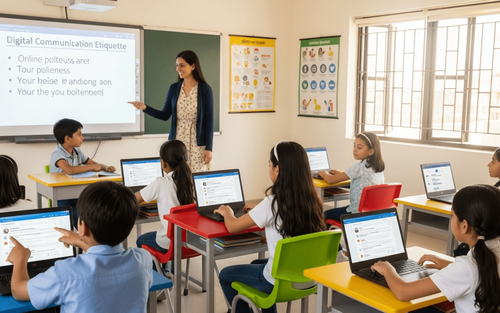

Table of Contents
- Digital Etiquette and Safety
- What Is Digital Communication Etiquette?
- Why Digital Manners Matter
- Core Rules of Digital Etiquette for Kids
- Platform-Specific Etiquette for Students
- Red Flags: Signs of Poor Digital Etiquette
- How to Teach Digital Manners at Home
- Common Digital Etiquette Mistakes To Avoid
- How PlanetSpark Teaches Responsible Digital Communication Et
Your 10-year-old sends a message: "k"
Their teacher emails a question. Your child replies: "idk lol."
A classmate shares good news in the group chat. Your child doesn't respond.
Welcome to the world of digital communication, where kids text faster than they think, where tone disappears, and "online manners" often don't exist.
Here's the reality: kids are growing up online. Group chats. Video calls. Gaming platforms. Social media. Email. Virtual classrooms.
They are communicating constantly. But no one taught them HOW.
They don't know that "k" feels rude. That, ALL CAPS LOOKS LIKE YELLING. That ignoring messages hurts feelings. Emojis can be misunderstood. Those screenshots last forever.
And these small mistakes? They have real consequences.
Damaged friendships. Misunderstood intentions. Cyberbullying. Academic consequences. Even future job prospects (yes, colleges and employers check social media).
Digital communication etiquette is not optional anymore.
This guide shows you exactly what kids need to know and how to teach it simply, clearly, and effectively.
At PlanetSpark, we believe communication skills matter everywhere: in person AND online. And it's high time we help our kids build both.
Digital Etiquette and Safety
Good etiquette overlaps with safety. The same rules that make you a responsible digital citizen also protect you from online risks.
When students learn how to behave respectfully and safely online, they not only protect themselves but also create a healthier digital space for everyone.
Here’s what every student should understand:
1. Never Share Personal Information Publicly
Personal details may seem harmless, but online they can be misused.
Teach students not to share:
- Full name
- Home address
- Phone number
- School name or class details
- Passwords (not even with close friends)
Why?
Strangers can use this information to track, contact, or impersonate you. Even innocent posts like “Waiting outside XYZ School” reveal more than you think.
Example:
If a child posts their school name in their bio, anyone online instantly knows where to find them.
2. Don’t Talk to Strangers Online
Just like in real life, not everyone online has good intentions.
Teach students:
- If someone unfamiliar sends a message or friend request, do not reply.
- Always inform a parent or teacher if a stranger tries to initiate a conversation.
Why?
People online can pretend to be younger, friendlier, or trustworthy. Children must learn that not every online “friend” is a safe friend.
Example:
A stranger asking, “What school do you go to?” is a clear red flag.
3. Report Bullying or Inappropriate Content
Students need to know that speaking up is not “snitching”; it’s protecting themselves and others.
Teach them:
- Take a screenshot as evidence
- Immediately tell a trusted adult
- Report the user or content on the platform
Why?
Online bullying can escalate quickly if ignored. Reporting early prevents further harm and keeps the online environment safer for everyone.
Example:
If someone sends rude messages in a group, screenshot and inform a teacher; don’t engage.
4. Understand That “Screenshots Last Forever”
The internet never forgets.
Teach students:
- Even if you delete something, someone may have already saved or shared it
- Once you send a picture, message, or comment, you lose control over it
- Think before you post: “Would I be okay if everyone saw this? ”
Why?
Many students mistakenly believe that deleting a post makes it disappear. But screenshots can spread instantly, sometimes causing long-term embarrassment or harm.
Example:
A joke meant for a friend can be shared across the entire school within minutes.
5. Use Privacy Settings Wisely
Privacy settings are the first line of defense online.
Teach students:
- Make accounts private
- Only accept follow/friend requests from people you personally know
- Turn off location sharing
- Review who can see your posts and the information on your profile
Why?
Private accounts give students more control over who sees their content and who can interact with them.
Example:
A private account means strangers cannot view photos, send messages, or comment.
Remember: Digital etiquette and digital safety go hand in hand. When students learn to be polite, respectful, and cautious online, they automatically become safer users. Every click, message, and post should be thoughtful and responsible because the online world has real-life consequences.
That’s why PlanetSpark took extra care of students to be well-mannered not only in the physical world but also in virtual life.
What Is Digital Communication Etiquette?
Digital etiquette (or "netiquette") means using good manners when communicating online.
It includes:
- Being respectful in texts, emails, and comments
- Understanding tone and context
- Knowing when to respond (and when not to)
- Respecting privacy
- Avoiding hurtful or harmful content
- Communicating clearly
Digital etiquette is treating people online the same way you'd treat them face-to-face with kindness, respect, and thoughtfulness.
The Golden Rule Still Applies: Treat others the way you want to be treated, even through a screen.
Why Digital Manners Matter
They Affect Relationships
Poor digital etiquette damages friendships.
Example: Your child's friend shares exciting news in a group chat. Your child reads it but doesn't respond. The friend feels ignored and hurt.
Why it matters: Online silence can feel like rejection.
They Impact Academic Success
Teachers communicate via email and learning platforms. Poor etiquette can hurt grades and relationships with educators.
Example: A student emails, "Yo teach can I get the hw"
Why it's problematic: Disrespectful tone. No greeting. No punctuation. Teachers notice.
They Shape Digital Footprint
Everything posted online can be screenshot, shared, and saved forever.
Reality check:
- Colleges review social media during admissions
- Future employers Google candidates
- One careless post can have lasting consequences
They Prevent Cyberbullying
Poor digital etiquette often escalates into bullying: intentional or accidental.
Example: A sarcastic comment in a group chat ("nice job 🙄") gets misunderstood. Feelings are hurt. Conflict erupts.
Why it matters: Tone is HARD to read online. What feels like a joke to you might feel like an attack to someone else.
They Build Professional Skills Early
Email etiquette, professional messaging, and video call manners: these are workplace skills. Teaching them young gives kids a head start.
Make your kid learn the best digital etiquette with PlanetSpark.
Core Rules of Digital Etiquette for Kids
Here are the non-negotiables every child should learn.
1. Think Before You Send
The Rule: Pause before hitting send. Ask: "Would I say this to their face? Could this hurt someone?"
Example:
Impulse: This is so dumb.
After thinking: I don't understand this. Can you explain?
Teach the 5-Second Rule: Count to 5 before sending anything emotional or unclear.
2. Use Proper Greetings and Sign-Offs
The Rule: Start with "Hi" or "Hello." End with "Thanks" or "Best."
Good Email Example:
Hi Mr. Sharma,
I missed yesterday's class due to illness. Could you please send me the homework?
Thank you,
Riya
Bad Email Example:
Yo, what was the hw
Why it matters: Greetings show respect. Sign-offs show professionalism.
3. Avoid ALL CAPS and Excessive Punctuation
The Rule: ALL CAPS = YELLING. Too many exclamation marks = overly emotional!!!!!!
Example:
❌ WHERE IS MY BOOK??!?!?!
✅ Have you seen my book?
Why it matters: How you type changes how people feel.
4. Respond in a Reasonable Time
The Rule: If someone messages you directly, respond within 24 hours (unless there's a reason you can't).
Why it matters: Silence creates anxiety. "Did I upset them? Are they ignoring me?"
Exception: You are not obligated to respond to spam, strangers, or uncomfortable messages.
5. Don't Share Private Conversations
The Rule: If someone messages you privately, don't screenshot and share it without permission.
Why it matters: Trust. Once broken, it's hard to rebuild.
Exception: If someone is threatening, bullying, or sharing harmful content, tell a trusted adult immediately.
Make your kid learn the best digital etiquette with PlanetSpark.
6. Be Careful with Humor and Sarcasm
The Rule: Sarcasm doesn't translate well online. What's funny in person can sound mean in text.
Example:
In person (with a smile): Oh sure, you are SO good at soccer 😄
In text: "Oh sure, you are SO good at soccer"
How it's read: Mean. Insulting.
Solution: Use emojis carefully or just be direct.
7. Respect Different Time Zones and Schedules
The Rule: Don't expect instant replies. People have lives offline.
Why it matters: Not everyone is glued to their phone. Patience is part of digital etiquette.
8. Proofread Before Sending
The Rule: Check for typos, clarity, and tone.
Example:
Before proofreading: "i dont no what ur talking abt"
After proofreading: "I am not sure what you mean. Can you clarify?"
Why it matters: Clear communication = fewer misunderstandings.
9. No Ghosting
The Rule: If you can't continue a conversation, say so. Don't just disappear.
Example:
❌ Reads message. Never responds.
✅ I need to go now. Talk later!
Why it matters: Ghosting feels disrespectful.
10. Ask Permission Before Tagging or Posting About Others
The Rule: Don't post photos or information about someone without their consent.
Why it matters: Privacy. Respect. Not everyone wants to be online.
Learn age-appropriate digital communication etiquette with PlanetSpark.
Platform-Specific Etiquette for Students
Different platforms have different rules.
Red Flags: Signs of Poor Digital Etiquette
Watch for these warning signs in your child's online behaviour:
They frequently:
- Send one-word responses ("k," "lol," "idk")
- Ignore messages from friends or teachers
- Use ALL CAPS or excessive punctuation
- Post without thinking
- Share private conversations publicly
- Get into online arguments
- Send messages late at night
- Use inappropriate language or emojis
If you see 3+ red flags, it's time to teach digital etiquette actively.
How to Teach Digital Manners at Home
1. Model Good Digital Etiquette
Kids copy what they see.
What to do:
- Respond to messages thoughtfully
- Use proper grammar in texts (when appropriate)
- Don't text at the dinner table
- Speak respectfully online
Result: They learn by watching you.
2. Practice Email Writing Together
Activity: Have your child email a family member (grandparent, aunt, uncle) about their week.
Check for:
- Greeting
- Clear message
- Proper closing
Result: Practice in low-stakes situations builds confidence.
3. Discuss Real Scenarios
Ask:
- Your friend posted something embarrassing about you. What do you do?
- Someone sends a mean comment in the group chat. How do you respond?
- You accidentally hurt someone's feelings online. What's your next step?
Result: It prepares them for real situations before they happen.
4. Create Family Digital Rules
Example Rules:
- No phones during meals
- No texting after 9 PM (unless emergency)
- Ask before posting photos of family members
- Respond to messages within 24 hours
- No social media accounts until age [you decide]
Result: Clear boundaries create clear expectations.
5. Review Their Messages Periodically (Age-Appropriate)
For younger kids (under 13), periodic check-ins are reasonable.
How to do it respectfully: I am not spying. I am teaching. Let's review a few messages together and talk about what's good and what could improve.
Result: Guidance, not punishment.
6. Teach the "Grandma Rule."
The Rule: Would you be okay with Grandma reading this?
If not, don't send it.
Result: Simple. Memorable. Effective.
Learn age-appropriate digital communication etiquette with PlanetSpark.
Common Digital Etiquette Mistakes To Avoid
Mistake 1: Using Text Speak in Formal Communication
❌ hey teach can u send hw thx
✅ Hi, Mr. Patel, could you please send today's homework? Thank you!
Mistake 2: Sending Too Many Messages at Once
❌ Sending 15 separate one-word texts in a row
✅ One clear message with complete thought
Mistake 3: Ignoring Tone
❌ whatever (sounds rude)
✅ Okay, I understand (neutral and respectful)
Mistake 4: Oversharing
❌ Posting location, full name, school name, and personal details publicly
✅ Keeping private info private
Mistake 5: Not Asking Before Calling
❌ Calling someone randomly without warning
✅ Texting first: "Can I call you?"
Why it matters: Calls are intrusive. Texts give people time to respond.
How PlanetSpark Teaches Responsible Digital Communication Etiquette
At PlanetSpark, we prepare kids for ALL forms of communication, including digital.
Clear Communication Training
We teach kids to express ideas clearly, whether speaking or writing.
Result: Better emails. Clearer texts. Thoughtful messages.
Confidence in Expression
Kids learn to communicate without aggression, passivity, or confusion.
Result: Respectful, effective digital communication.
Critical Thinking
We teach kids to THINK before they speak or type.
Result: Fewer impulsive messages. More thoughtful communication.
Real-World Scenarios
We discuss situations kids actually face: group chats, online conflicts, and misunderstandings.
Result: Prepared kids who know how to navigate digital challenges.
Digital communication isn't going away. It's growing.
Video calls. Group chats. Emails. Social media. Online classrooms. Gaming platforms.
Your child will spend THOUSANDS of hours communicating digitally throughout their life.
The question is not whether they'll use these tools. It's whether they'll use them WELL.
Good digital etiquette opens doors. Poor etiquette closes them.
It affects friendships, academic success, future job prospects, and even mental health.
The good news?
Digital manners are teachable. Learnable. Practicable.
Start today. Model good behavior. Set clear rules. Practice together. Discuss scenarios.
Teach your child that the screen doesn't erase the human on the other side.
Teach them to pause before sending. To choose words carefully. To communicate with kindness, clarity, and respect.
Because the way they communicate online shapes how the world sees them.
And you have the power to guide that.
And if you are a curious soul who wants to know more, then feed yourself with these fun articles:
What is Netiquette
Etiquette in communication
Simple Guide to Digital Communication
Frequently Asked Questions
Digital communication means sending and receiving information through electronic devices using digital signals (0s and 1s). It’s important because it makes sharing ideas faster, easier, and possible from anywhere in the world.
It refers to respectful online behaviour, including tone, message timing and avoiding harmful content.
Digital communication etiquette is using good manners when communicating online and being respectful, clear, thoughtful, and safe in texts, emails, chats, and social media.
It protects relationships, prevents misunderstandings, avoids cyberbullying, builds professional skills, and shapes a positive digital footprint.
As soon as your child starts using digital devices to communicate, typically around age 8-10. But even younger kids benefit from basic lessons.
No. Emojis are fine with friends but not in emails to teachers, coaches, or other adults. Save them for casual conversations.
For younger kids (under 13), periodic check-ins are reasonable for safety and teaching. Be transparent: "I'm teaching you, not spying." And yes, don’t be sneaky. It may frustrate them. Respect their privacy as they mature.